
A few years ago, if you wanted to create a professional website, the usual path was to hire a developer, learn how to use WordPress, or turn to a website builder.
Today you can open an artificial intelligence tool, write a few instructions, and get a first version of your site in minutes.
You can even ask it to change the colors, add sections, create forms, or modify the design without touching a single line of code.
And that raises an inevitable question:
Does it still make sense to use WordPress in 2026?
The answer isn't as simple as it seems.
WordPress is still the most widely used content management system in the world, but the data shows it has lost share over the last few years.
At the same time, platforms like Webflow, Wix and Lovable are offering ways to build sites and applications with less manual work.
Are we witnessing the beginning of the end for WordPress, or simply a new stage in web development?
Let's look at it with statistics and concrete examples, without writing off a product that still powers a huge part of the Internet.
WordPress still dominates the Internet, but something is changing
Let's start with the numbers.
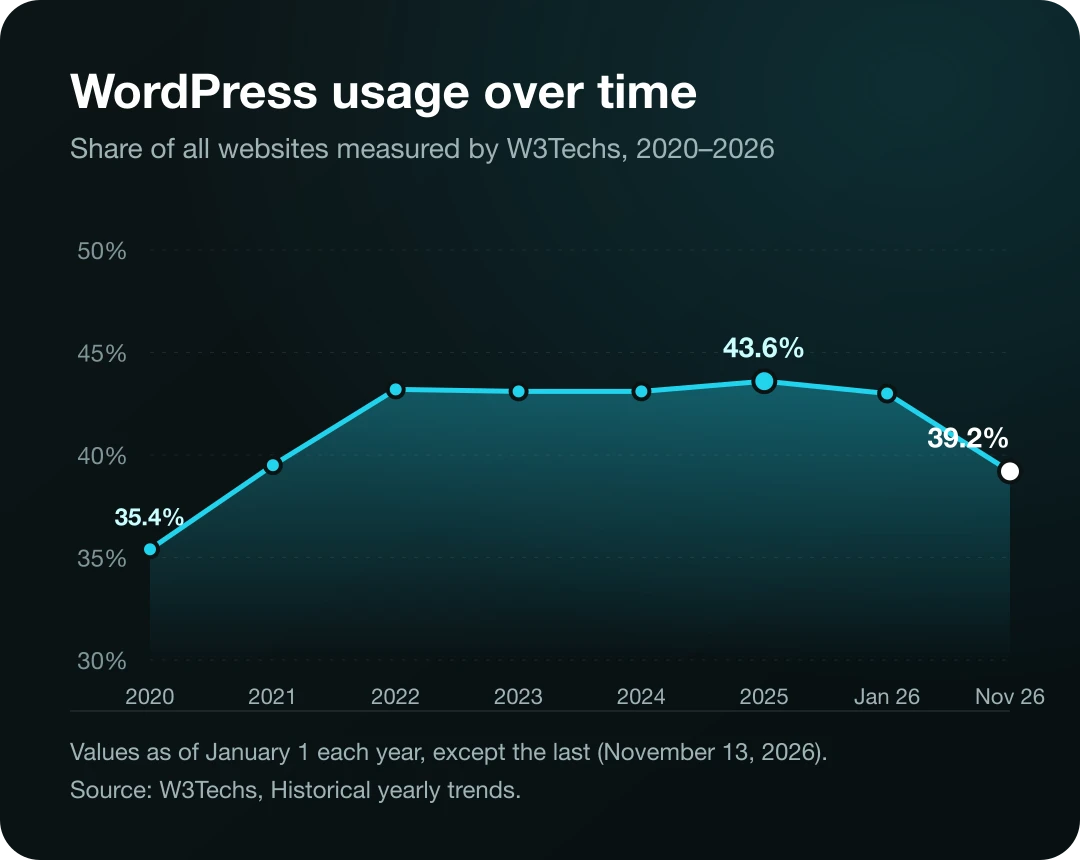
According to statistics from W3Techs, on November 13, 2026, WordPress was present on approximately 39.2% of all websites included in its measurements.
If we consider only the sites whose content management system could be identified, WordPress accounted for 57.9%.
That's an enormous share.
It means that, even with the arrival of new platforms, WordPress still has a far larger presence than any other individual CMS.
But there's one figure that deserves attention.
In January 2025, WordPress appeared on 43.6% of the websites measured by W3Techs.
By November 2026, that figure had dropped to approximately 39%.
We're talking about a decline of more than four percentage points.
Does this mean millions of businesses are abandoning WordPress for artificial intelligence tools?
Not necessarily.
The statistics record changes in the technologies detected, but on their own they don't explain why those changes happen.
Some projects may be migrating to other platforms, while others may be new sites built with different technologies.
Changes in the sites included in the measurements can also play a role.
That's why it's important to separate two things: that WordPress is losing share is a measured fact; that AI is the main cause still requires more evidence.
You can review the historical evolution at W3Techs — Historical Trends.
How much market share do Shopify, Wix and Webflow have compared to WordPress?
To understand the competition, it isn't enough to look at WordPress alone.
We also need to look at what's happening with other platforms.
According to W3Techs data collected on November 13, 2026, the approximate shares were as follows:
| Platform | Percentage of all websites | Share among identified CMSs |
|---|---|---|
| WordPress | 39.2% | 57.9% |
| Shopify | 5.4% | 7.9% |
| Wix | 4.2% | 6.2% |
| Squarespace | 2.4% | 3.6% |
| Webflow | 0.8% | 1.2% |
Source: W3Techs — CMS Market Share.
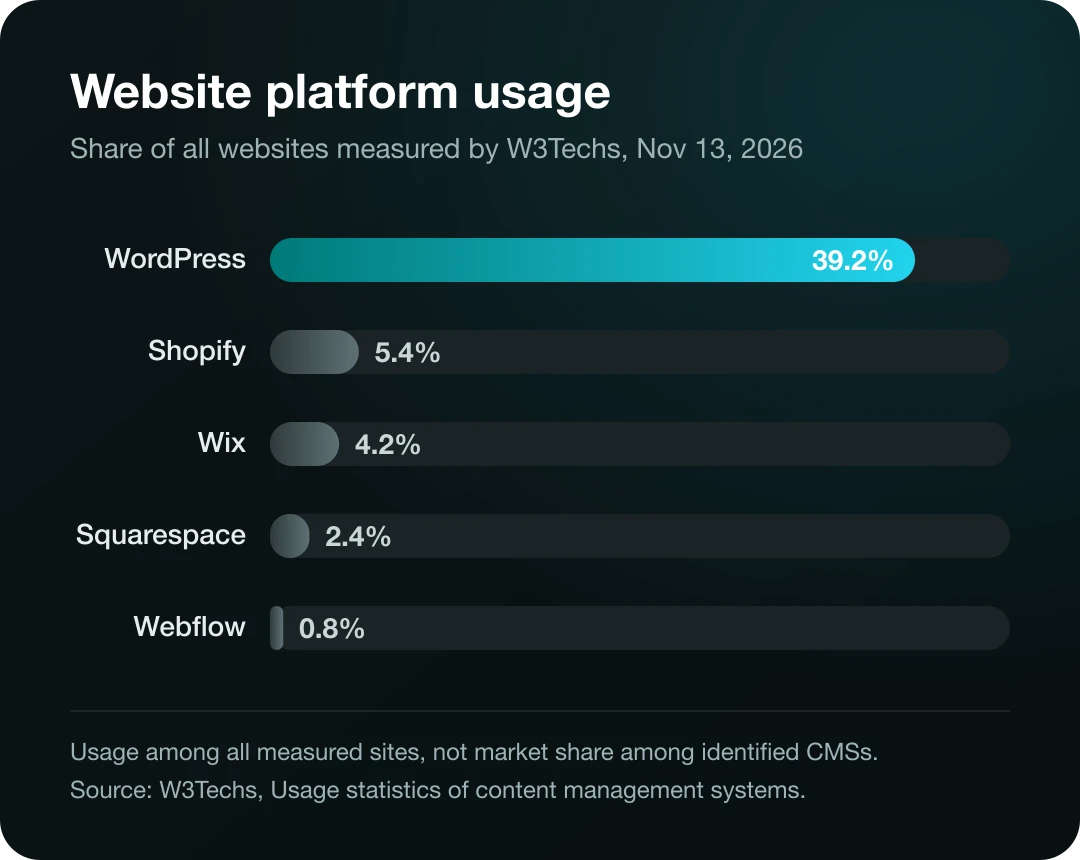
Although Shopify and Wix are still far behind WordPress in overall share, both platforms have grown since 2020.
Webflow has also established itself as an alternative for certain types of projects.
Keep in mind that these platforms aren't fully equivalent.
Shopify is primarily focused on e-commerce.
Webflow combines visual design tools, content management, and hosting.
Wix offers an integrated ecosystem for websites and businesses.
WordPress, for its part, is an open-source CMS that can be extended through themes, plugins, and custom development.
So comparing their percentages is useful for understanding the market, but it doesn't mean they're competing for exactly the same customers.
Artificial intelligence changed the way websites are built
For years, building a website meant a combination of design, programming, installing tools, and configuring services.
Even with WordPress, you had to choose a theme, install plugins, set up the pages, and configure the hosting.
Visual builders simplified that process.
Then came tools capable of generating designs from written instructions.
And now we're entering a stage where some systems can create complete structures for sites and applications.
Imagine you write:
"I want a website for a coffee shop. I need a home page, a product menu, information about the location, and a contact form. Use warm colors and a minimalist design."
A compatible tool can generate a first version from that description.
That considerably reduces the effort needed to create certain prototypes.
However, there's a difference between generating a visually appealing page and building a site that's ready to receive real customers.
You still need to review the forms, accessibility, performance, security, content, and integrations.
AI speeds up part of the process, but it doesn't automatically turn every result into a finished product.
Lovable: building applications by describing what you need
One of the platforms that represents this shift is Lovable.
Its pitch is to let a person describe an application or website and use artificial intelligence to generate an implementation.
For example, you can request an admin dashboard, a task-tracking app, or a business landing page.
Then you can continue the conversation to modify features or fix elements.
This has popularized a practice known as vibe coding: developing software through natural-language instructions, using AI models to generate much of the code.
The advantage is obvious.
Someone without advanced programming experience can experiment with ideas that previously required a longer development process.
But risks also appear.
A prototype can work visually and still have significant bugs in authentication, data handling, or permissions.
In addition, as a project grows, it becomes necessary to understand how it's structured and how it will be maintained.
Building an application quickly doesn't mean that application is ready for production.
For commercial projects, testing and technical review remain important.
Webflow: visual design and artificial intelligence
Webflow is also bringing artificial intelligence into its site-building process.
In February 2026 it introduced improvements to its AI Site Builder, a tool that lets you start by describing the site you need.
It can generate a multi-page structure and an initial design that you can then modify visually.
According to its official documentation, the builder lets you create new sites using AI, subject to certain conditions depending on the plan.
This is interesting because it combines two approaches.
AI speeds up the initial creation, while the visual editor lets you keep working on the design.
You don't have to rely exclusively on prompts to make every change.
For a designer who wants to build commercial sites with detailed visual control, this combination can be appealing.
But Webflow doesn't replace every custom development need either.
Projects with complex business logic or specific integrations may require additional solutions.
Wix is also betting on artificial intelligence
Wix is another platform that has added AI capabilities.
In addition to its site-building tools, it has developed options for integrating web creation workflows with external assistants and development tools.
Its documentation on Wix Headless and AI tools explains how compatible tools can be used to generate and publish sites connected to its infrastructure.
This reflects a broader trend.
Traditional platforms are trying to incorporate the experience of building through instructions, rather than competing exclusively against it.
And that brings us to the next point.
WordPress has AI tools too
It may seem contradictory, but one of WordPress's responses to the growth of artificial intelligence is to incorporate AI into its own ecosystem.
In April 2025, WordPress.com introduced an AI-powered website builder.
With this tool, users can describe the kind of site they want and get an initial proposal.
Since then, the product has evolved into an experience based on the WordPress Agent.
According to WordPress.com's official documentation, the agent lets you build and customize sites through instructions.
It can also help with various administrative tasks within the available features and permissions.
This shows that we aren't necessarily looking at a showdown between WordPress and artificial intelligence.
In many cases, AI is becoming an additional feature of existing platforms.
There's an important distinction: WordPress.com is a hosted service, while WordPress.org distributes the open-source software you can install and manage yourself.
Not every WordPress.com feature is automatically available in any WordPress.org installation.
That's why it's worth checking the specific features of the product before choosing a platform.
So why do some people prefer to leave WordPress?
Although it's still a powerful tool, WordPress has aspects that can be inconvenient depending on the project.
Maintenance and updates
A self-hosted WordPress site needs maintenance.
You have to keep up with core, theme, and plugin updates, and also make sure the changes don't cause incompatibilities.
The official WordPress documentation recommends making backups before updating and checking the installed extensions.
This doesn't mean WordPress is insecure by definition.
It means its flexibility also comes with technical responsibilities.
Plugin dependency
One of WordPress's biggest advantages is its ecosystem of extensions.
You can add functionality without building it from scratch.
But installing too many plugins, especially if they're outdated or poorly developed, can make maintenance more complex.
In addition, certain combinations can cause performance or compatibility problems.
Learning curve
Although WordPress lets you create sites without coding, a custom project may require knowledge of themes, plugins, hosting, and optimization.
For someone who only needs a simple page, a hosted platform could offer a more straightforward experience.
Project needs
Some applications need functionality that doesn't fit naturally into a traditional CMS.
For example, a SaaS application with complex logic and intensive data processing can benefit from an architecture built specifically for those needs.
But that doesn't mean WordPress can't be used for custom applications.
Its architecture offers APIs, content types, and extensions that make it possible to build systems that go well beyond a blog.
The right question isn't whether WordPress can do it, but whether it's the most suitable option in terms of cost, maintenance, and complexity.
WordPress vs. Lovable vs. Webflow vs. Shopify: which one is right for you?
Before choosing a tool, it's worth comparing what kinds of projects it's designed for.
| Platform | Best suited for | Main consideration |
|---|---|---|
| WordPress | Blogs, corporate sites, and projects that require a flexible CMS | Maintenance depends on hosting and configuration |
| Webflow | Commercial sites with custom visual design | Some capabilities depend on the ecosystem and plan |
| Shopify | Online stores that need e-commerce operations | Costs and customizations within its platform |
| Wix | Commercial sites with integrated services | Customization options depend on the chosen solution |
| Lovable | Prototypes, applications, and AI-generated projects | Review architecture, security, and maintenance |
This comparison is a general guide.
No platform guarantees a faster, more secure, or more profitable project simply because you use it.
It's possible to build a slow site with any of them if it's configured incorrectly.
It's also possible to get excellent results when the tool is used for the right project.
Can artificial intelligence replace a web developer?
AI can automate many development-related tasks.
It can generate components, write styles, propose structures, and help detect errors.
On certain simple projects, this can allow a person to build a first version without hiring a development team.
But creating professional software involves activities that go beyond producing code.
For example, you have to understand what the client needs, define permissions, protect information, and verify that integrations work correctly.
You also have to maintain the project as needs change.
And this is where an important difference appears.
In the past, many hours of work could go into manually implementing relatively simple components.
Now part of that work can be sped up with AI tools.
That can change both the services developers offer and what clients are willing to pay for certain tasks.
However, it doesn't prove that the entire profession is going to disappear.
Rather, it increases the value of understanding architecture, business needs, and the quality of the result.
The ability to generate code quickly is useful.
The ability to spot when that code is wrong may be even more important.
What will happen to web design agencies?
Agencies will also have to adapt.
For years, some services focused mainly on delivering a visually appealing website.
Today a client can generate initial proposals using AI.
That's why simply selling the creation of basic pages may be less of a differentiator.
Agencies can add value through research, strategy, user experience design, accessibility, integrations, performance, and maintenance.
They can also help connect a website to sales, customer service, analytics, and automation systems.
For example, a business doesn't just need a site with a form.
It may need contacts to be recorded in its CRM, assigned to a salesperson, and given proper follow-up.
In that scenario, the website is one piece of a broader process.
The technology used matters, but it isn't the only thing that determines the value of the service.
Is WordPress better for SEO than a website built with AI?
Not necessarily.
Google doesn't automatically rank a page because it uses WordPress, Webflow, or an artificial intelligence tool.
The search engine needs to be able to access the content, interpret it, and evaluate it.
Google's official SEO guide explains aspects related to structure, content, URLs, and how easily search engines can discover information.
A website built with AI can rank if it meets the technical requirements and offers useful content.
Likewise, a website built with WordPress can have serious indexing problems if it's poorly configured.
What you should review includes:
- Original content that's relevant to the user.
- Clear URLs.
- Navigation and internal links.
- Appropriate metadata.
- Proper indexability.
- Performance and mobile experience.
- Structured data where applicable.
SEO plugins can make some tasks easier, but they don't replace an editorial strategy or guarantee a spot in the top results.
And generating hundreds of pages with AI doesn't guarantee traffic either.
Is it worth learning WordPress in 2026?
Yes, if you want to work on projects that need content management, business websites, or maintenance of existing installations.
Despite the drop in share, WordPress is still present on a considerable portion of the web.
That means there are still sites that need improvements, integrations, updates, and redesigns.
But if your goal is to become a web developer, I wouldn't limit your learning to a single CMS.
Learning HTML, CSS, JavaScript, APIs, databases, and security fundamentals will help you understand how applications work.
Then you'll be able to use WordPress, Webflow, AI tools, or frameworks depending on what the project needs.
What matters is not relying solely on knowing a platform's interface.
Tools can change.
Technical fundamentals are more transferable.
How to choose the technology for your next website
Before starting a project, consider five questions.
1. What do you need to build?
A brochure site, an online store, and a SaaS application may require different technologies.
2. Who will maintain the project?
If the owner needs to edit content without technical knowledge, the admin system is just as important as the design.
3. What integrations do you need?
Check whether you need to connect a CRM, payment systems, inventory, bookings, or other applications.
4. What level of customization does it require?
Not every project needs custom code, but some do.
5. How much will it cost to maintain?
Beyond the initial development, consider hosting, licenses, updates, external services, and support.
The best tool isn't necessarily the one that lets you build the first version fastest.
It's the one that strikes the right balance between the project's needs and its long-term maintenance.
Frequently asked questions
Is WordPress dying in 2026?
WordPress has lost share according to W3Techs, but it's still the most widely used CMS. The data doesn't allow us to conclude that it's disappearing, or that the entire decline is due to artificial intelligence.
How many websites use WordPress?
On November 13, 2026, W3Techs estimated that WordPress was present on 39.2% of the sites it measured. That figure represents a proportion, not an exact count of every page on the Internet.
Can Lovable replace WordPress?
It can be an alternative for certain projects, especially prototypes and applications. But WordPress has specific content management features and an ecosystem of extensions that may be more appropriate in other cases.
Which is better, WordPress or Webflow?
It depends on the project. WordPress offers flexibility and the option to self-host. Webflow integrates visual design and hosting within a specific ecosystem. The decision should take into account maintenance, features, and budget.
Can you build a professional website using AI?
Yes, but the result needs review. You have to check how it works, its security, accessibility, content, and performance before publishing it.
Does Google penalize pages created with AI?
Google evaluates the quality and usefulness of content, regardless of how it's produced. The problem isn't using AI as a tool, but publishing content that violates its policies, for example through large-scale spam practices.
Is WordPress still a good option for online stores?
It can be, through WooCommerce, especially when you're looking for flexibility and tight integration with WordPress. Shopify is also a relevant alternative, particularly for businesses that prefer a hosted e-commerce ecosystem.
Should I migrate my website from WordPress to another platform?
Not just because a technology is trendy. First, assess whether your current site has concrete problems with performance, maintenance, costs, or functionality. Migrating also involves risks and technical work.
Conclusion: WordPress isn't dead, but building websites will never be the same
The numbers show that WordPress is losing part of its share.
They also show that it still widely dominates the market for identified content management systems.
At the same time, artificial intelligence tools are lowering the barriers to creating sites and applications.
That changes users' expectations and the way professionals develop projects.
But it doesn't mean a single platform is going to replace all the others.
WordPress can still be an excellent option for certain projects.
Webflow may be a better fit for others.
And tools like Lovable can speed up the development of prototypes and applications.
The question we should be asking isn't whether WordPress is going to die tomorrow.
It's whether we're choosing our tools out of habit or because they actually solve the problem in front of us.
Because in the end, a website shouldn't be judged by the logo of the technology it was built with.
It should be judged by its usefulness, how well it works, and the results it delivers.
About the author
Rafael Azuaje is a computer engineer with experience in web development and UX/UI design. He shares educational content about technology, artificial intelligence, and automation, with a practical focus for those who want to learn to use digital tools with sound judgment.
Updated November 17, 2026. The CMS statistics correspond to the cutoff date stated in the article and may change with new measurements.