
Over the last few years, we got used to using artificial intelligence in a fairly simple way: we type a question, wait a few seconds, and get an answer.
We ask it to write an email, summarize a document, explain a concept, or help us solve a problem.
But imagine something different.
Instead of asking an AI to explain how to organize your customers' emails, you give it controlled access to your inbox so it can sort the messages, identify which ones need attention, and prepare replies for you to review.
Or imagine you have an online store, and a system can check the status of an order, verify the customer's information, and prepare a personalized reply without you having to look up that data manually.
That is the kind of task artificial intelligence agents are designed for.
The difference seems small, but it changes quite a lot about how we use technology.
We go from asking for answers to delegating processes.
And while AI agents can be very useful, it is also important to understand what they can really do, what limitations they have, and when it makes sense to use them.
What is an artificial intelligence agent?
An artificial intelligence agent is a software system that uses AI to perform tasks and make certain decisions within a defined goal.
Unlike a traditional chatbot, which usually just replies to messages, an agent can have access to external tools to look up information or carry out actions.
For example, it can search for data in an application, check a calendar, analyze documents, or create records in a business system.
Depending on how it is designed, it can also decide which steps to follow and which tool to use to complete a task.
Google Cloud describes agents as software systems that use AI to pursue goals and complete tasks on behalf of users.
OpenAI, for its part, explains that the core components of an agent include an artificial intelligence model, instructions, and tools.
But there is an important distinction: not every system that uses AI is an agent.
An application that simply sends a question to a model and displays its answer can be perfectly useful, but that does not mean it is able to carry out actions.
To understand this better, let's look at an example.
Chatbot vs. AI agent: what's the difference?
Imagine you have an online store and a customer asks:
"Hi, I made a purchase three days ago and I still haven't received my order. Can you tell me where it is?"
A conventional chatbot might reply:
"To check the status of your order, go to the website and look at the tracking section."
It is a valid answer, but the customer still has to do the work.
Now imagine an agent connected, with the right permissions, to the store's order system.
The agent could ask for the order number, check its status, retrieve the available shipping information, and report the result.
If the system shows there is an issue, it could prepare a case for the support team.
In this scenario, the AI does more than produce text. It also uses tools to interact with other systems.
| Feature | Basic chatbot | AI agent |
|---|---|---|
| Answer questions | Yes | Yes |
| Look up external data | Only if it has integrations | Can use connected tools |
| Carry out actions | Usually not | Yes, when authorized |
| Plan multiple steps | Limited or design-dependent | Can do it |
| Adapt to intermediate results | Limited | Can reconsider its next steps |
| Need human oversight | Depends on the use | Especially important for sensitive actions |
The difference is not absolute. There are chatbots that use tools and agents with very limited autonomy.
In fact, an agent can have a chat interface.
What matters is not how the application looks, but what the system can actually do when it receives an instruction.
How does an artificial intelligence agent work?
Although there are different architectures, we can understand an agent through four elements: an AI model, instructions, tools, and a mechanism that coordinates the process.
1. The artificial intelligence model
This is the component that interprets the request and helps determine how to resolve it.
For example, it can use a language model to understand a question, extract relevant information, or decide which tool is best to use.
Not every agent needs the most advanced model.
A simple classification task can be handled by a less expensive model, while a complex activity may require stronger reasoning capabilities.
2. The instructions
These are the rules that define the agent's behavior.
Imagine an agent in charge of handling customer requests.
Its instructions could state that it must check the available information before replying, use a professional tone, and ask for human approval before promising a refund.
These rules help set boundaries, but they should not be considered an absolute guarantee of safety.
That is why it is important to complement the instructions with technical controls.
3. The tools
This is one of the big differences compared to an AI that only generates answers.
Tools allow an agent to interact with applications and services.
For example:
- Look up records in a CRM.
- Search for information in documents.
- Review orders in an online store.
- Check availability on a calendar.
- Create a task in a project management tool.
- Prepare or send an email.
- Run a function defined by a developer.
Access to these functions must be set up through proper integrations and permissions.
Having an advanced model does not mean it can automatically get into any application.
4. The execution process
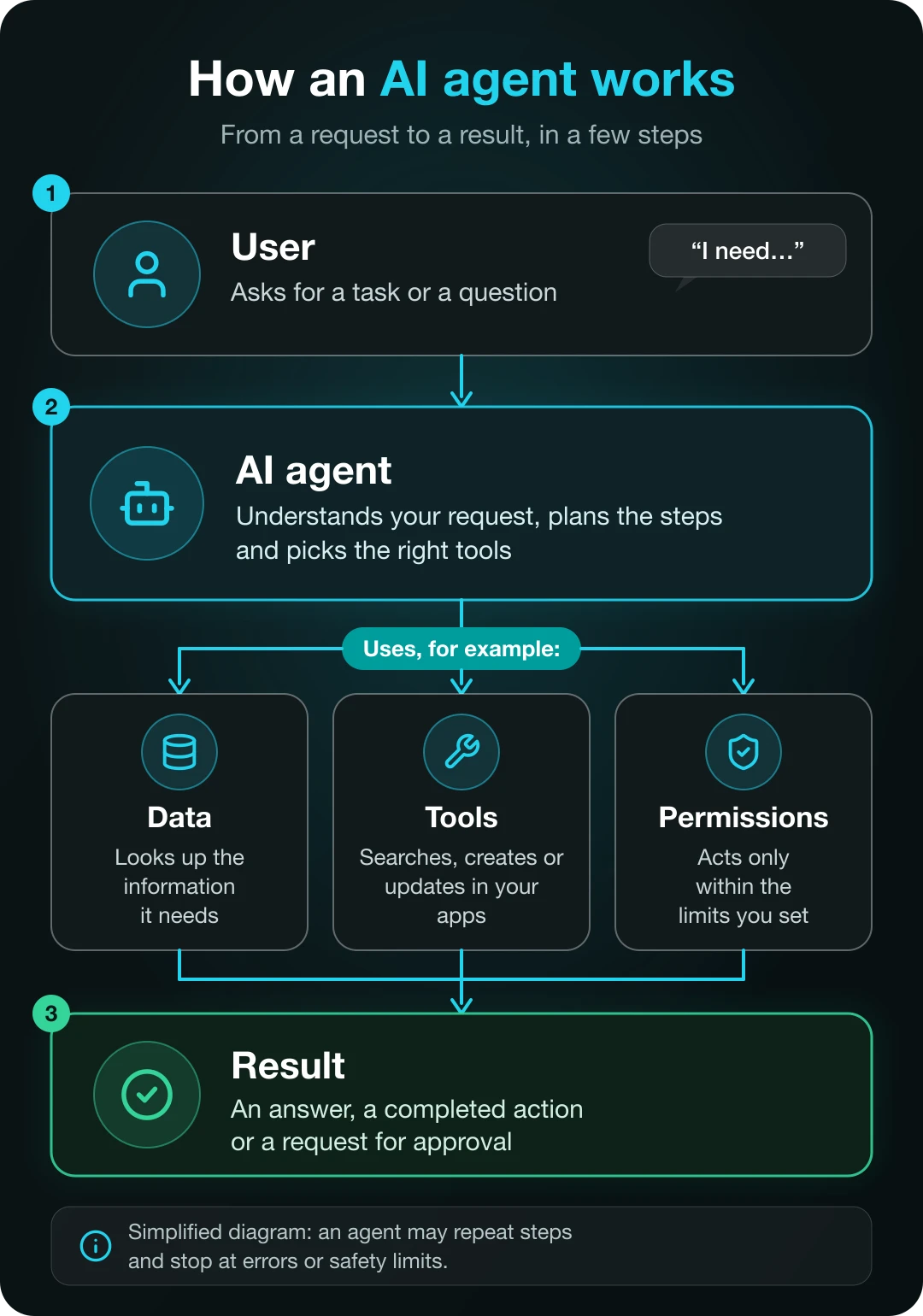
An agent can work by following a multi-step cycle.
First, it interprets the request.
Then it determines whether it needs to look up information or use a tool.
When it gets the result, it can analyze it and decide what to do next.
Finally, it delivers an answer or performs the authorized action.
If the information is not enough, it should be able to ask for clarification or stop the process.
This mechanism is often known as an agent cycle or agent loop.
Practical example: an agent that handles questions for a store
Let's say you have an electronics store.
A customer writes on WhatsApp:
"Hi, do you have the Logitech MX Keys keyboard in stock? How much does it cost, and how long does shipping to Santiago take?"
A well-configured agent could follow this process:
Step 1. Understand the request.
It identifies that the customer is asking about availability, price, and delivery time.
Step 2. Check the catalog.
It uses an integration with WooCommerce, Shopify, or another e-commerce system to search for the product.
Step 3. Verify the information.
It gets the recorded price and inventory.
Step 4. Check the shipping conditions.
It accesses the shipping rules or a logistics API, if one is available.
Step 5. Prepare the reply.
It writes a message using the retrieved data.
Step 6. Reply or request approval.
Depending on the configured permissions, it sends the message or leaves it ready for review.
The interesting part is that the agent can adapt its behavior if something changes.
For example, if the product is out of stock, it could look up authorized alternatives instead of continuing with a generic reply.
But there are also limits.
If it does not have access to up-to-date inventory, it should not make up an available quantity. If the logistics platform does not provide a delivery date, it should not promise one either.
A good agent is not one that always says something. It is one that knows when it has enough information to act.
Five examples of AI agents you can use
Agents have applications across different industries, but you don't need to run a huge company to find them useful.
1. Customer service agent
It can help answer frequently asked questions, look up orders, sort requests, and route complex cases to a human operator.
It is especially useful when a business receives repetitive questions.
That said, any action involving returns, payments, or significant changes to a purchase needs proper controls.
2. Agent for organizing emails
It can analyze incoming messages and sort them by content.
For example, it could tell apart sales inquiries, invoices, support requests, and messages that need an urgent reply.
It can also prepare drafts using authorized information.
When starting out, it is better for the system to prepare replies without sending them automatically.
3. Agent for researching content
If you create social media posts, an agent could check public sources, identify news related to your topics, and organize the information in a document.
For example, you could ask it:
"Research the most relevant artificial intelligence news published over the last seven days. Prioritize official announcements, identify their dates, and prepare a summary with links to the sources."
This agent should not make up popularity metrics or present news without checking the dates.
And even if it can prepare a draft, a person should review the facts before publishing them.
4. Agent for managing tasks
It can receive information from emails or forms and turn it into tasks in a management platform.
For example, when a customer sends a message asking for a change to their website, it could identify the requested work, prepare a description, and create a pending task.
If the request is ambiguous, it can flag it as pending review.
5. Document analysis agent
It can look through contracts, manuals, internal policies, or project documentation to answer questions based on those files.
A proper implementation should indicate where the information comes from and acknowledge when a piece of data does not appear in the documents.
This makes it possible to build specialized assistants without having to manually enter all the context in every conversation.
AI agents vs. traditional automations
You have probably used some kind of automation without realizing it.
For example, when someone fills out a form and automatically receives a confirmation email.
That process follows predefined rules.
If A happens, do B.
Traditional automations are excellent for repetitive, predictable tasks.
But what happens when the content of a request keeps changing?
Imagine you receive messages from customers with completely different questions.
Some people ask for a quote. Others need technical support. Others ask about the status of a project.
Creating a specific rule for every variation can get complicated.
This is where AI can add flexibility.
An agent can interpret the message and select an appropriate action from the available options.
| Traditional automation | AI agent |
|---|---|
| Follows explicit rules | Can interpret variable information |
| Its execution is usually predictable | Can choose between several paths |
| Ideal for repetitive processes | Useful when there are context-based decisions |
| Usually easier to test | Requires broader behavior testing |
| Can work without AI models | Usually uses AI models |
But this does not mean agents should replace every automation.
In fact, the best solution is often to combine both technologies.
For example, an automation can detect that a new message has arrived, and an agent can interpret its content to choose a category.
Then another traditional automation can carry out the corresponding action.
It is a more controllable approach than leaving every decision up to a model.
What tools can you use to build an AI agent?
There are different options, depending on your technical knowledge and the project.
n8n: for combining AI with visual automations
n8n lets you build workflows by connecting different services through nodes.
It also has capabilities for creating workflows that use AI agents and tools.
This lets you build processes where a model receives information, queries connected services, and returns results.
It is an interesting option if you want to learn automation without building all the infrastructure from scratch.
That does not mean any agent can be built just by dragging blocks around. Some integrations require configuring APIs, authentication, expressions, and error handling.
OpenAI Agents SDK: for developing custom agents
OpenAI offers development tools for implementing agent systems in applications.
With its Agents SDK you can configure models, instructions, tools, controls, and coordination mechanisms between agents.
It is a good option when you need to build these capabilities directly into a software product.
It requires programming knowledge and familiarity with the services you want to connect.
LangChain and LangGraph: for more customized workflows
LangChain and LangGraph offer tools for developing applications based on language models, including processes with tools and state.
They are useful for projects that need more control over the execution flow.
For example, you can design a process that combines database queries, validations, and human review.
Which one should you choose?
If you are just starting out and want to understand how applications connect, I would explore a visual tool like n8n first.
If you know how to code and need to build an agent integrated into an application, you can evaluate an SDK like OpenAI's.
And if you need a custom architecture with more complex workflows, you could look into LangGraph.
There is no ideal tool for every case.
The best option depends on the task, the team's skills, and how easy the system is to maintain.
How to build your first AI agent step by step
Let's imagine a simple project.
Our goal will be to create an assistant that receives customer questions and prepares replies using a document of frequently asked questions.
We don't need to give it permission to send emails, modify orders, or make payments.
We only want it to look up information and prepare replies for review.
Step 1. Define a specific task
Avoid starting with an instruction like:
"I want an AI that takes care of my entire business."
It is too broad and hard to evaluate.
Instead, define a specific function:
"I want an assistant that answers questions about business hours, services, and terms of sale using only my company's authorized information."
The clearer the goal, the easier it will be to measure whether the system works correctly.
Step 2. Organize the information
Prepare a document with the frequently asked questions.
For example:
What are your business hours?
Monday to Friday, 9:00 a.m. to 6:00 p.m.
Where is the company located?
Enter the business's real address here.
What services do you offer?
Include the up-to-date catalog.
What should it do if it can't find an answer?
Route the question to a person.
The data above is only an example. You should replace it with your company's real information.
Step 3. Choose the tool
For this exercise, you can use n8n and set up a test workflow with a trigger node, an AI agent node, the corresponding model, and a tool for querying the documentation.
The exact structure will depend on the version and the type of integration you use.
If your workflow doesn't need the model to dynamically decide which tool to use, you can also start with a simpler AI chain.
Step 4. Define the agent's instructions
An initial configuration could be:
You are a customer service assistant. Your role is to answer questions using only the authorized information you receive from the connected tools.
If you can't find the information you need, say so and ask for the question to be reviewed by a person.
Do not make up prices, hours, policies, or availability.
Do not make changes to orders, payments, or personal information.
Prepare clear, brief replies. Do not send messages automatically without approval.
These instructions set the expected behavior, but you must also limit the agent's technical permissions.
Step 5. Connect the tools you need
For this exercise, a single source of information is enough.
It can be a document, a knowledge base, or a database that contains the authorized answers.
Don't connect your email, CRM, and entire store just because the tool allows it.
Every additional permission increases the reach of possible errors.
Step 6. Test different situations
Don't settle for asking a simple question and checking that it answers correctly.
Also test harder situations:
- A question whose answer does appear in the document.
- A question whose answer is not available.
- An ambiguous request.
- A message that covers several topics.
- A request that tries to get the agent to ignore its instructions.
- A question about information the user should not be able to access.
Check not only the quality of the text, but also whether it used the right tools and respected the restrictions.
Step 7. Turn on human review
At first, set up the system so it prepares replies that you can review.
This will let you catch errors, improve the instructions, and learn how the agent actually behaves.
Once you have evidence that the system works correctly in different scenarios, you can consider automating certain low-risk actions.
There is no need to jump straight to full autonomy.
When does it make sense to build an agent, and when doesn't it?
It's easy to get excited about the possibility of automating processes with AI.
But not every task justifies building an agent.
If you only need to send an email when someone fills out a form, a traditional automation is probably enough.
If you want to transform a CSV file using perfectly defined rules, a conventional program can be more reliable, faster, and cheaper.
Agents make the most sense when there is a combination of variable information, context-based decisions, and tools that make it possible to complete a task.
Before building one, ask yourself these questions:
- Does the problem really require interpreting language or unstructured information?
- Are there several possible paths depending on the data received?
- Does the system need to look things up or use tools?
- Can I check whether the result is correct?
- What would happen if the agent makes a mistake?
If you can't clearly define the expected result, you probably need to improve the process before automating it.
The risks of using artificial intelligence agents
This is one of the most important parts.
A chatbot can give a wrong answer.
But an agent with permission to use tools can make mistakes with real consequences.
Imagine an agent connected to a customer database.
If it misinterprets an instruction and modifies a record, the problem is no longer just an inaccurate answer.
Now it has changed information inside a system.
The OWASP organization identifies a risk known as excessive agency, or an excessive capacity to act.
It appears when a system based on language models has more functions, permissions, or autonomy than it needs.
There is also the risk of instruction injection, known as prompt injection.
For example, an agent might read a web page or a document that contains malicious instructions meant to manipulate its behavior.
If the system treats that external content as a trusted command, it could try to perform unauthorized actions.
How to reduce these risks
The first recommendation is to limit permissions.
If an agent only needs to read information, it should not have access to delete or modify it.
It is also a good idea to set limits on the number of actions, execution time, and resource usage.
For sensitive operations, it is best to use human confirmations.
Tools should validate parameters and permissions regardless of the model's instructions.
Finally, log the actions performed and set up mechanisms to detect failures.
A simple rule: the greater the potential impact of an action, the more control there should be before carrying it out.
Can AI agents work on their own?
Yes, but with some caveats.
An agent can carry out multiple steps without a person having to step in at each one.
Some systems can also be triggered by events, scheduled times, or requests from other applications.
But autonomy does not mean complete independence.
Agents depend on infrastructure, models, tools, credentials, and limits set up by the people who implement them.
They can also make mistakes, misinterpret a request, or stop because of technical failures.
That is why it is important to distinguish between a system capable of working autonomously on certain tasks and an AI that supposedly can run an entire business without supervision.
The latter usually exaggerates the real capabilities.
Will artificial intelligence agents replace jobs?
They are likely to transform certain activities, especially those that involve looking up information, sorting requests, preparing documents, and carrying out repetitive procedures.
However, automating tasks does not necessarily mean eliminating entire professions.
A person who works in customer service, for example, can spend less time answering frequently asked questions and more time resolving complex situations.
A marketing professional can use agents to gather information and organize research, but still needs judgment to interpret the results and decide what to publish.
New responsibilities will also emerge around the supervision, integration, security, and evaluation of these systems.
Rather than assuming every job will disappear, it is better to analyze which activities can be automated, which need supervision, and where human judgment remains essential.
What comes after AI agents?
One direction of development is coordination between different specialized agents.
Imagine a system where one agent researches information, another organizes the results, and a third prepares a report.
A coordinating component can distribute tasks, share context, and check results.
This is known as a multi-agent architecture.
But having more agents does not necessarily mean getting better results.
Each additional component introduces costs, complexity, and possible points of failure.
In fact, the technical recommendations from OpenAI and Anthropic highlight the importance of starting with simple systems and increasing their complexity only when there is a concrete need.
It is especially valuable advice for those who are just getting started.
Frequently asked questions about AI agents
What is an AI agent in simple terms?
It is a program that uses artificial intelligence to perform tasks, look up information, and carry out certain actions through connected tools.
Its behavior depends on the instructions, permissions, and capabilities it has been configured with.
Is ChatGPT an artificial intelligence agent?
ChatGPT is a platform that can offer conversational experiences and, depending on the available features, the ability to use tools and carry out tasks.
Not every conversation with ChatGPT is an agentic process. The difference depends on whether the system is using tools and carrying out actions to reach a goal.
Do I need to know how to code to build an AI agent?
Not necessarily.
There are visual platforms that let you combine AI models with external services.
However, building a reliable agent requires understanding how integrations, permissions, validations, and error handling work.
Can I build an AI agent for free?
You can experiment using certain open-source tools or free environments.
But using models through an API, hosting services, or running many tasks can generate costs.
You should also consider usage limits and maintenance.
What is the difference between an agent and a virtual assistant?
A virtual assistant may only answer questions, while an agent can use tools to complete processes.
However, both terms are used broadly in the industry and can describe overlapping functionality.
Can agents make mistakes?
Yes.
They can misinterpret instructions, use outdated information, choose the wrong tools, or generate inaccurate answers.
That is why they need testing, permission limits, and supervision proportional to the risk.
What is a multi-agent system?
It is an architecture where several specialized agents work together to handle a process.
It can be useful in complex projects, although it also brings greater coordination, security, and maintenance requirements.
Conclusion: agents change what we can do with AI
Until recently, many people used artificial intelligence mainly to generate text, images, or answers.
Agents broaden that approach.
Now we can design systems that use tools, interpret situations, and carry out processes within defined limits.
But what really matters is not having an AI that does as many things as possible.
It is building a solution that solves a real problem safely and that we can supervise.
My recommendation is to start with a small task.
Don't try to build an agent that controls your entire business from day one.
Choose a repetitive process, define exactly what should happen, and check whether AI offers any advantage over a conventional automation.
Once that first solution works correctly, you can add new capabilities.
Because learning to use artificial intelligence is not just about writing better instructions.
It is also about understanding when to use it, how to connect it with other tools, and above all, how to recognize when something is not working the way it should.
About the author
Rafael Azuaje is a computer engineer with experience in web development and UX/UI design. He shares content about artificial intelligence, automation, and technology, with an educational focus aimed at people who want to learn to use these tools with good judgment.
Sources and documentation
- OpenAI — A Practical Guide to Building AI Agents
- OpenAI — Building Agents
- Anthropic — Building Effective AI Agents
- Google Cloud — What Are AI Agents?
- OpenAI — Agents SDK
- n8n — Official documentation
- LangChain — Documentation
- OWASP — LLM06:2025 Excessive Agency
Article reviewed against documentation available as of November 17, 2026.