
Remember when we were told that, to get good results from artificial intelligence, we had to write huge prompts?
You've probably seen one of those that started like this:
"Act as an expert in marketing, consumer psychology, copywriting, UX design, and digital strategy, with more than twenty years of experience."
And that was only the beginning.
Then came dozens of rules, instructions on how to think, formatting requirements, and phrases that supposedly forced the AI to produce professional results.
For a while, using ChatGPT seemed to be all about finding the magic words.
But artificial intelligence models have evolved.
Today they can understand more natural requests, interpret context better, and solve complex tasks without always needing endless instructions.
So, has prompt engineering stopped mattering?
Not exactly.
What's changing is the way we give instructions.
And understanding that can help you get better results without wasting time writing unnecessary paragraphs.
What is a prompt in artificial intelligence?
A prompt is the information or instruction you give an artificial intelligence system so it can generate a response or perform a task.

It can be as simple as a question:
"What is an API?"
Or something more specific:
"Explain what an API is using an online store as an example. Assume I've never programmed."
Both are prompts.
The difference lies in the information the system receives to understand what you need.
Also, prompts don't have to be text only.
Depending on the tool, you can use images, documents, audio, or other types of content as part of a request.
For example, you could send a photo of a product and ask for a description, or attach a document and request a summary.
OpenAI's documentation on prompting best practices explains that clear, specific instructions help guide the result.
But that doesn't mean you should include every possible technique in every request.
A useful prompt can be short or long. What matters is that it contains the information needed to solve the task.
Why were such long prompts recommended before?
When the first generative AI assistants started to become popular, many users discovered that adding context could improve the answers.
For example, a request like "write an email" was too general.
The AI didn't know who would receive the message, what its purpose was, or what tone it should use.
So templates with roles, steps, examples, and rules started to become popular.
Some were useful because they reduced ambiguity.
But others added instructions that had no direct relation to the task.
It was common to find prompts that demanded taking on five different professions, thinking in a certain way, and following a list of twenty conditions to answer a simple question.
With less capable models, certain strategies could produce improvements on specific tasks.
However, that never meant a longer prompt was automatically better.
And as reasoning models evolved, certain techniques stopped being necessary in many scenarios.
OpenAI's guide on reasoning models recommends starting with simple, direct instructions.
It also explains that explicitly asking the model to think step by step doesn't always improve its results and, in some cases, can hurt them.
These recommendations vary by model: what works well with one isn't always ideal for another.
The lesson is important:
The quality of a prompt isn't measured by its word count. It's measured by its ability to communicate what you need.
Do long prompts no longer work?
Yes, they work.
It's just that they aren't always necessary.
Imagine you want to know how long it takes the Earth to go around the Sun.
You don't need a page of instructions.
A simple question is enough.
Now imagine you want to prepare a business proposal for a company.
You need to explain what services you offer, who the client is, what the problem is, what information should be included, and what result you expect.
In that case, a longer prompt can be completely justified.
The key is telling useful information apart from unnecessary content.
Adding relevant context isn't the same as adding long phrases to try to impress the model.
Example of an unnecessarily complex prompt
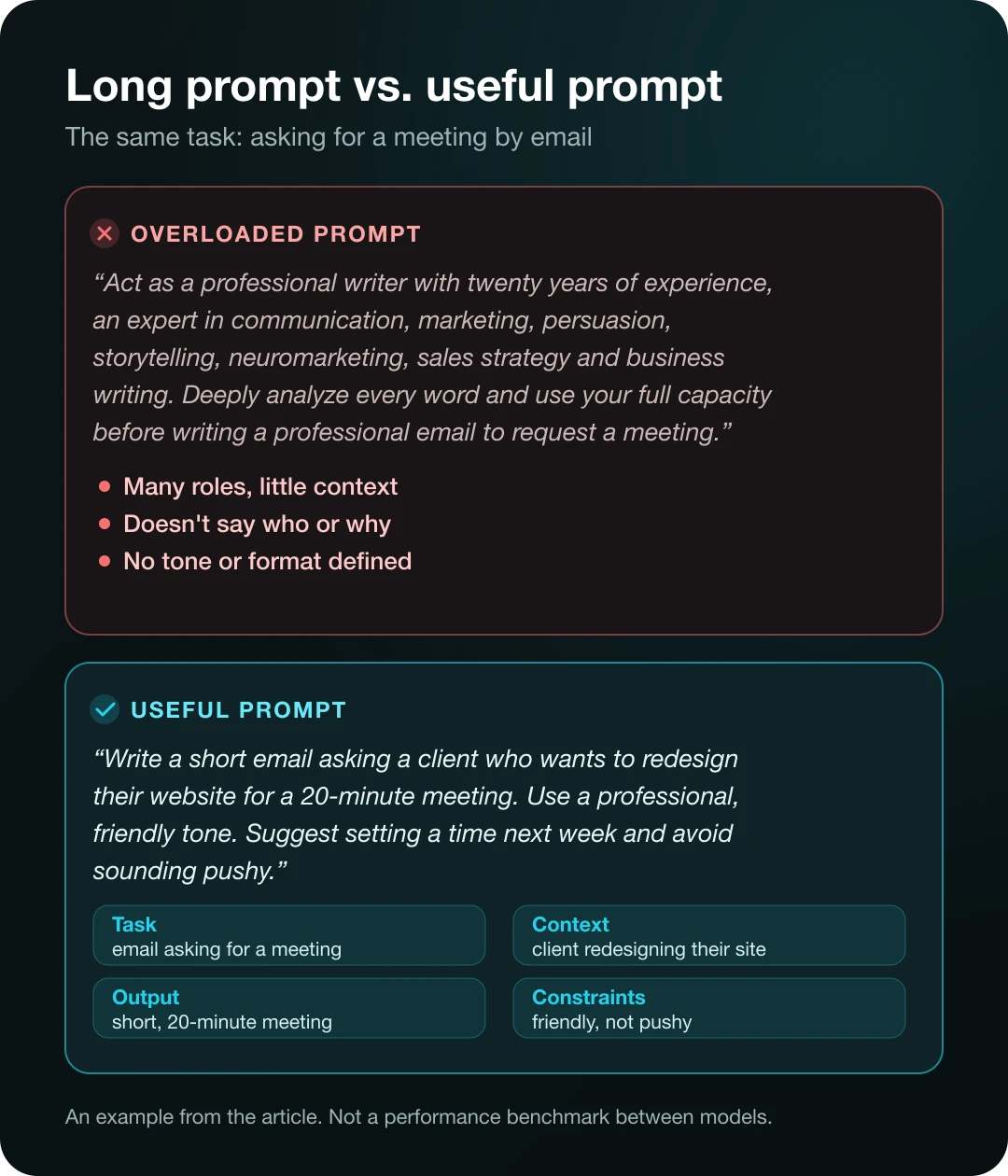
"Act as a professional writer with twenty years of experience, an expert in communication, marketing, persuasion, storytelling, neuromarketing, sales strategy, and business writing. Deeply analyze every word and use your full capacity before writing a professional email to request a meeting."
Most of the text doesn't define the actual situation.
The model still doesn't know who the email is for, what the meeting is about, or what tone is expected.
A more useful version
"Write a short email to request a 20-minute meeting with a client who wants to redesign their website. Use a professional, friendly tone. Suggest scheduling a time next week and avoid sounding pushy."
This second prompt is much shorter.
But it communicates the task, the context, and the expected result better.
That doesn't guarantee the first answer will be perfect.
It does reduce the decisions the model has to guess.
The four elements a good prompt really needs
When I teach how to use a technology tool, I prefer to start by understanding the problem before memorizing formulas.
The same goes for prompts.
You don't need a twenty-step structure for every question.
In many situations, four elements are enough.
1. The task
Explain what you want the artificial intelligence to do.
For example:
"Summarize this document."
"Compare these two options."
"Explain this code snippet to me."
"Draft an email."
It seems obvious, but many requests fail because the goal isn't clearly defined.
2. The context
Include the information the system needs to understand your situation.
For example:
"The document is aimed at people with no technical knowledge."
Or:
"The email will be sent to a client who already knows our services."
Context helps tailor the answer.
But you should include information that actually matters for the result.
You don't need to tell your company's whole history to ask for a three-line description.
3. The expected output
Explain how you want to receive the answer.
It could be a table, a short explanation, an article, a list of recommendations, or a code snippet.
For example:
"Organize the comparison in a table with advantages, limitations, and cost."
This saves you from having to ask for a complete format change afterward.
4. Key constraints
State the conditions that must not be broken.
For example:
"Use a maximum of 150 words."
"Don't make up statistics."
"Use only the data in the attached file."
"If information is missing, say so."
These conditions are more useful than vague instructions like "do it perfectly."
Anthropic's documentation on prompting best practices also recommends starting with clarity and adding complexity when the task requires it.
Five prompt examples you can improve starting today
Let's use everyday situations.

Example 1. Learning a concept
Overly general prompt:
"Explain artificial intelligence to me."
It's a valid question, but it can produce an explanation that's too broad.
Improved prompt:
"Explain what artificial intelligence is as if I were just starting to learn about technology. Use two everyday examples, avoid unnecessary technical terms, and end with a comparison between traditional AI and generative AI."
This prompt states the knowledge level, the content, and the format.
Example 2. Creating content for Instagram
Overly general prompt:
"Make me a post about automation."
Improved prompt:
"Write the copy for a six-slide Instagram carousel about what automation is. It's aimed at small business owners with no technical experience. Use everyday examples, explain one idea per slide, and end with a question that invites comments."
Here we don't need to pretend the AI is an expert in twenty professions.
We need to explain what we're building and who it's for.
Example 3. Analyzing information
Overly general prompt:
"Analyze these sales."
Improved prompt:
"Analyze this sales file. Identify the three products with the highest revenue, compare the monthly results, and point out any missing data. Deliver a table and a summary of no more than 200 words. Don't make up values or assume information that isn't in the file."
It's much easier to check whether the result fulfills the task.
Example 4. Programming
Overly general prompt:
"Fix my code."
Improved prompt:
"This React form lets data be submitted twice when the user double-clicks. Review the attached component, identify the cause, and propose the minimum change needed. Don't change its design. Include a test to check that duplicate requests aren't sent."
When we work with code, constraints become especially important.
For example, asking it not to change the design can prevent unnecessary modifications.
However, you also need to test that the solution actually works.
Example 5. Researching a current topic
Overly general prompt:
"Tell me the latest news about AI."
Improved prompt:
"Find five relevant announcements about artificial intelligence published in the last seven days. Prioritize official statements and reliable sources. Include the date, company, summary, and original link. Separate confirmed announcements from rumors."
In this case, the search needs access to recent information.
A well-written prompt can't make up for the lack of tools or up-to-date sources.
These examples are illustrative: they show how to structure a request better, not the results of comparative tests.
What is prompt engineering, and does it still matter?
Prompt engineering is the practice of designing, testing, and improving instructions to get useful results from artificial intelligence models.
Sometimes it's presented as the art of finding a secret formula.
But in real-world applications it looks much more like defining requirements properly and checking results.
Imagine you're building a system that classifies customer messages.
It's not enough to write a prompt that says:
"Classify these messages like an expert."
You need to define the categories, establish what happens when a request is ambiguous, and check how the system behaves with different examples.
You also need to measure whether it classifies correctly.
In that scenario, the prompt is only one part of the solution.
OpenAI's documentation on prompt engineering recommends evaluating model behavior through representative tests.
Anthropic also highlights the importance of defining success criteria before trying to improve instructions.
So prompt engineering hasn't disappeared.
It's simply evolving from generic templates toward designing and evaluating more reliable systems.
Do you still need to tell ChatGPT to act as an expert?
It depends on the task.
Specifying a role can help steer the focus of an answer.
For example:
"Review this page from the perspective of a web accessibility specialist."
This instruction communicates which aspects the analysis should prioritize.
But writing "act as the world's best expert, with thirty years of experience" doesn't turn the model into a person with that track record.
Nor does it guarantee accuracy.
And it certainly doesn't mean its recommendations can replace a professional review in high-risk areas.
If you want an accessibility analysis, it will usually be more useful to specify what it should check.
For example:
"Evaluate the color contrast, the accessible names of the buttons, keyboard navigation, and the heading hierarchy. Indicate which issues you can verify with the available information and which require additional testing."
Here we're defining specific criteria.
And that makes the result much easier to review.
Should you ask the AI to think step by step?
This recommendation was very popular for years.
The idea was to ask the model to work through a sequence of reasoning before answering.
With certain models and tasks, guided reasoning techniques could help.
But modern reasoning models work differently.
OpenAI explains that its reasoning models carry out part of that process internally.
That's why it recommends avoiding unnecessary instructions meant to force step-by-step reasoning.
Instead of asking it to describe all its thoughts, it's usually more useful to request a verifiable result.
For example:
"Solve the problem and include the calculations needed to verify the result."
Or:
"Compare the options, explain the criteria you used, and point out any data missing to make a decision."
There's no need to impose the same reasoning method on every task.
What does matter is being able to evaluate the answer.
What if a short prompt doesn't work?
You don't need to immediately rewrite it as a five-page document.
First, identify what went wrong.
Was the answer too general?
Add context.
Was the output in the wrong format?
Explain how you want to receive it.
Did it make up information?
Ask for sources and establish what it should do when it can't find enough data.
Did it ignore an important requirement?
Make it explicit and check whether it's met.
This approach is known as iterative refinement.
It consists of improving the instructions based on the results you observe.
For example, you can start with:
"Write a description of this product."
Then review the answer and add:
"The description is aimed at buyers with no technical experience. Cut back on overly specialized features and explain the benefits in simple terms."
This way, you use the conversation to improve the result.
OpenAI's official recommendations for ChatGPT highlight precisely the importance of working iteratively.
When a long prompt does make sense
It would be a mistake to conclude that all prompts should be short.
There are projects where you need to provide quite a lot of information.
For example, developing an application with specific business rules.
In that case, it's important to specify what the system should do, what users exist, what their permissions are, how data is processed, and which features must not be modified.
The same goes for reviewing a contract, preparing a financial report, or analyzing extensive documentation.
Context can be essential.
However, there's a difference between providing detailed requirements and adding redundant instructions.
A long document can be excellent if every section contributes necessary information.
A short one can also be bad if it doesn't explain what's expected.
The question isn't how many words the prompt has, but how many of them help solve the problem.
What alternatives are there to repeating the same prompts over and over?
When you start using AI every day, another problem appears.
You may have processes you repeat constantly.
For example, preparing blog articles, reviewing code, or creating social media posts.
Instead of writing the same instructions again and again, you can use configuration mechanisms or reusable resources.
Custom instructions
Some platforms let you save general preferences about how you want to receive answers.
This is useful for setting your usual language, tone, or communication style.
Projects and workspaces
Certain tools let you organize documents, conversations, and instructions within a project.
That helps keep the context related to a task or area of work.
AI Skills
Skills let you package reusable procedures through instructions and additional files.
For example, a Skill can define how to review an article before publishing it.
It doesn't replace the specific request; instead, it provides a procedure that a compatible system can consult.
Artificial intelligence agents
Agents go one step further.
They can use tools to look up information or perform authorized actions.
For example, an agent can query an order system to help answer a request.
But having an agent doesn't remove the need to properly define its goals, tools, and permissions.
In other words, we're moving from explaining every operation in a single message to organizing processes that can be reused.
If you want to go deeper, check out our articles on AI Skills and artificial intelligence agents.
The most dangerous mistake: believing a good prompt guarantees a correct answer
An excellent instruction doesn't make an artificial intelligence infallible.
The model can make mistakes, misinterpret information, or use outdated data.
For example, you might ask:
"Find the five most recent vulnerabilities in a software library."
But if the system doesn't have access to current sources, it shouldn't present made-up information as if it were verified.
Likewise, you can request an analysis of a legal document.
Even if the prompt is clear, you still need to check that the analysis accurately represents the content.
Something similar happens in programming.
An assistant can propose a solution that looks reasonable but introduces a security issue.
That's why, for important tasks, improving the prompt isn't enough.
You need to check the results.
This may involve reviewing sources, running tests, cross-checking calculations, or requesting a professional review. If you publish what AI produces, Google also recommends that content be reliable and created for people.
A good instruction helps guide the work.
Verification lets you determine whether the result is reliable.
How to write better prompts in 2026: my practical method
If you're just starting out, I recommend a five-question method.
Before sending a request to the AI, try to answer them.
What do I want to achieve?
Define the main result.
What information does it need?
Include the relevant context.
Who is the result for?
Specify the audience when it matters.
How should it deliver it?
State the format or length.
How will I know if it's right?
Define criteria that let you review the answer.
For example:
"Write a 300-word explanation of what a NAS is. It's aimed at people who have never used a server. Include a home example and explain two advantages and two limitations. Avoid unexplained jargon and don't make up prices."
This prompt is relatively short.
But it contains enough information to guide the task.
And if the result needs adjustments, you can continue the conversation.
You don't need to start from scratch every time.
A simple prompt template you can reuse
If you want a starting structure, use this one:
Task: explain what you need.
Context: provide relevant information.
Output: state what format you expect.
Constraints: define important limits and conditions.
For example:
"I need [task]. The context is [relevant information]. The result should include [required elements] and be delivered as [format]. Keep in mind [key constraints]. If essential information is missing, say so."
It's not a magic formula.
It's a way to remember what information usually helps the system.
With practice, you'll probably stop needing it for simple tasks.
And that's precisely the goal: learning to communicate what you need clearly.
Frequently asked questions about AI prompts
What is a prompt?
It's the input you give an artificial intelligence model to request a response or task. It can include text and, depending on the tool, images, audio, or documents.
Do long prompts work better?
Not necessarily. A long prompt can be useful when it includes relevant requirements and context. Length alone doesn't guarantee better results.
Is it still worth learning prompt engineering?
Yes, especially if you use artificial intelligence professionally or build applications based on models. Clear instructions and result evaluation remain important.
Do I need to say "act as an expert" in all my prompts?
No. Defining a perspective or function can be useful, but you don't need to add an artificial role to every request.
Is it better to write prompts in English?
There's no universal rule. Modern models can work in Spanish and other languages. Quality depends on the model, the task, and the clarity of the instructions. You can start in the language you master best.
Can I ask the AI to improve my prompt?
Yes. You can share an initial instruction and ask it to identify ambiguous or missing information. Then check whether the changes actually help you get the expected result.
Do Skills replace prompts?
No. Skills let you reuse procedures and instructions. Prompts are still useful for defining the task you need done.
Does a good prompt prevent hallucinations?
Not completely. It can help reduce errors, but you need to verify sources and results when accuracy matters.
Which is better: a short prompt or a detailed one?
The one that communicates what's needed without adding useless complexity. For simple questions, a brief instruction is usually enough. For complex projects, extensive requirements may be necessary.
Conclusion: the future isn't writing longer prompts, but knowing how to ask for better results
Prompts haven't disappeared.
Nor is there any reason to stop learning how to use them properly.
But our relationship with artificial intelligence is changing.
We no longer need to start every conversation with an endless list of roles, professional titles, and generic commands.
For many tasks, modern models can work very well with clear, natural instructions.
And when the process is more complex, we can rely on projects, Skills, agents, and specialized tools.
My recommendation is to stop searching for the perfect prompt.
Instead, learn to define good goals, provide useful context, and check the results.
Because knowing how to use artificial intelligence isn't about writing the longest instruction.
It's about understanding what you need, communicating it clearly, and recognizing when the answer actually solves your problem.
About the author
Rafael Azuaje is a computer engineer with experience in web development and UX/UI design. He shares educational content about artificial intelligence, automation, and technology, focused on teaching how to use digital tools in a practical and thoughtful way.
Article updated on November 18, 2026.